
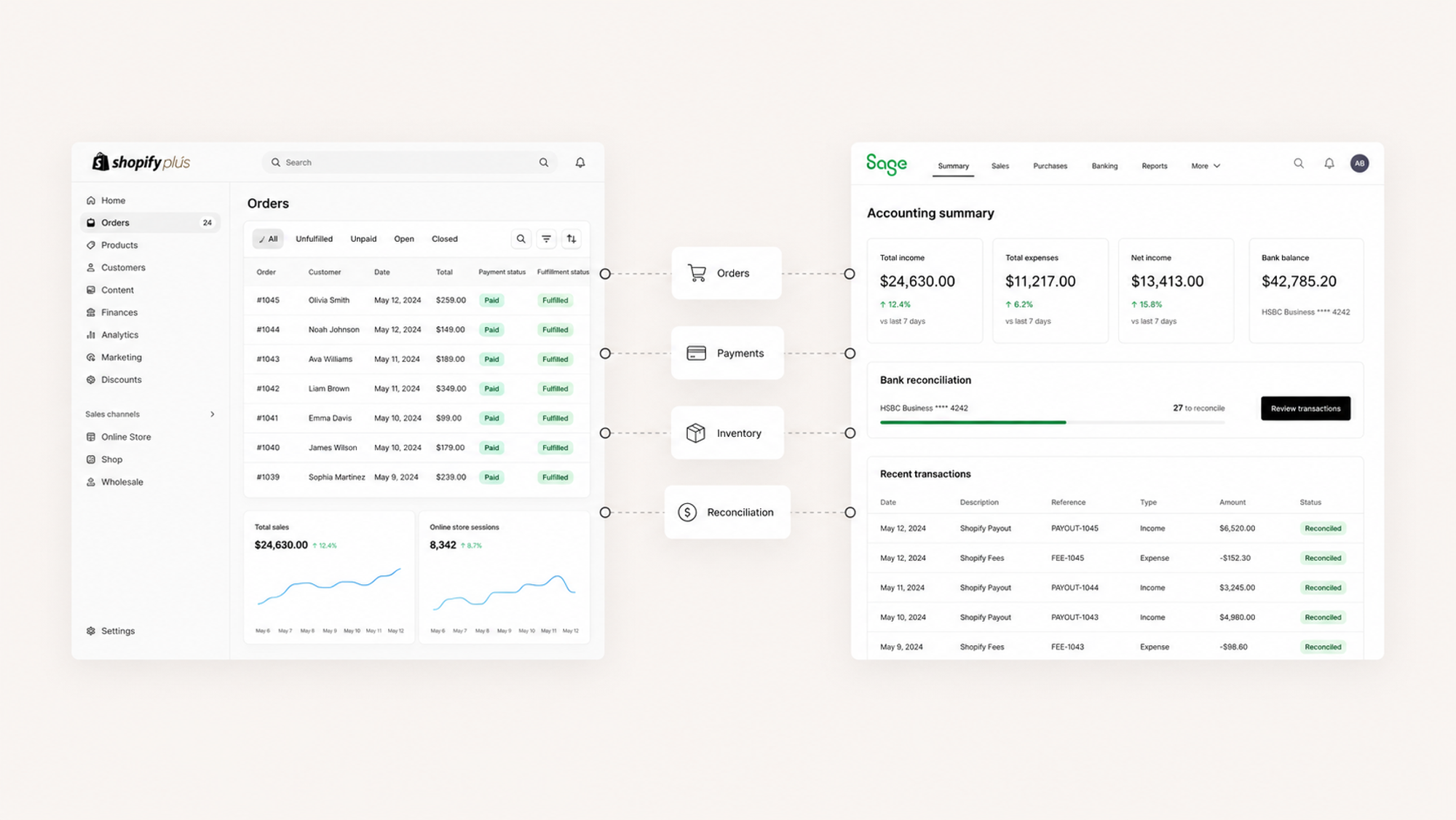
Sage to Shopify Plus Integration: Connecting Your Financials Without the Drift

Partnering with the right Shopify eCommerce Design Agency can build a storefront that delivers real business impact.
copy link

Sage to Shopify Plus Integration: Connecting Your Financials Without the Drift

Key takeaways

  • A Sage to Shopify Plus integration is as much a finance project as a commerce one. Sage is where your numbers have to be right, so accuracy is the whole point.
  • Which Sage product you run, Intacct, X3, 100, or 300, changes the integration approach. They don't all expose data the same way.
  • The data that has to flow is predictable: orders, payments, inventory, customers, and tax. The work is deciding what syncs in which direction, and when.
  • Done right, the finance team stops re-keying orders and stops running parallel spreadsheets, because Sage and Shopify finally agree.

If you're running Sage behind your Shopify Plus store, you care about one thing above all: the numbers reconcile. Sage is your financial source of truth, and the moment your storefront and your books disagree, your finance team feels it first and trusts the system least.

So a Sage integration isn't really a "connect two tools" project. It's a "make one set of numbers true everywhere" project. Here's what that takes.
How does Sage integrate with Shopify Plus?

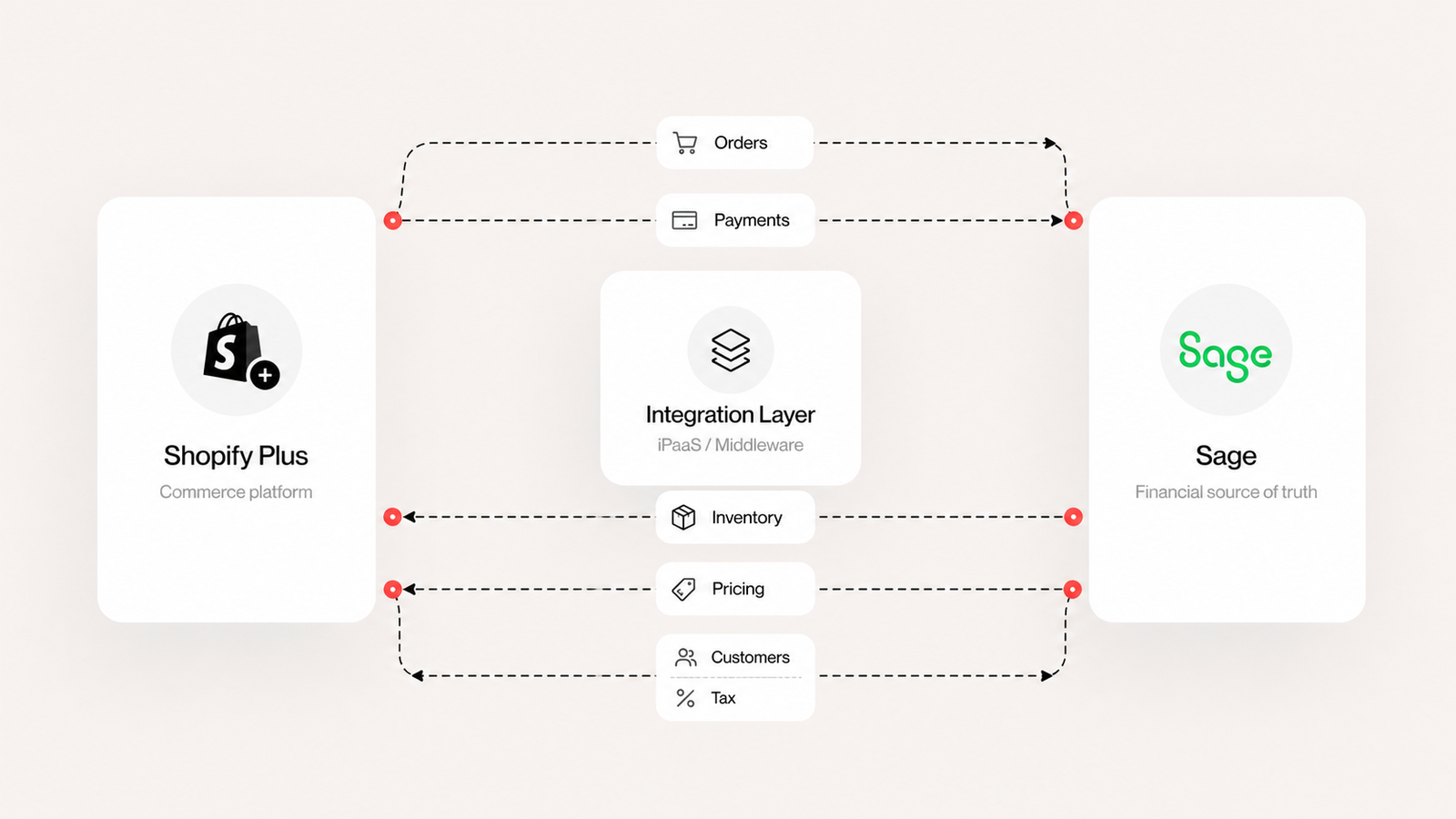
There are three honest paths, and the right one depends on your volume and your Sage product.

A connector or iPaaS platform (think Celigo, Patchworks, or similar) gets you a configurable, maintained pipeline without building from scratch. It's the right call for a lot of brands, especially when your data flows are fairly standard.

A custom integration through Sage's and Shopify's APIs makes sense when your logic is specific enough that a templated connector would need so much customization you've effectively built custom anyway. This is the path when you have multi-entity accounting, unusual order-to-cash logic, or strict requirements about how revenue posts.

A hybrid uses an iPaaS for the standard flows and custom logic for the parts that need it. In practice this is where a lot of enterprise builds land.

None of these is automatically "best." The best one is the one that matches your accounting complexity, and naming that complexity early is what keeps the project honest.

Sage Intacct vs. Sage X3: does the integration change?

Yes, and it's worth knowing why before you scope anything.

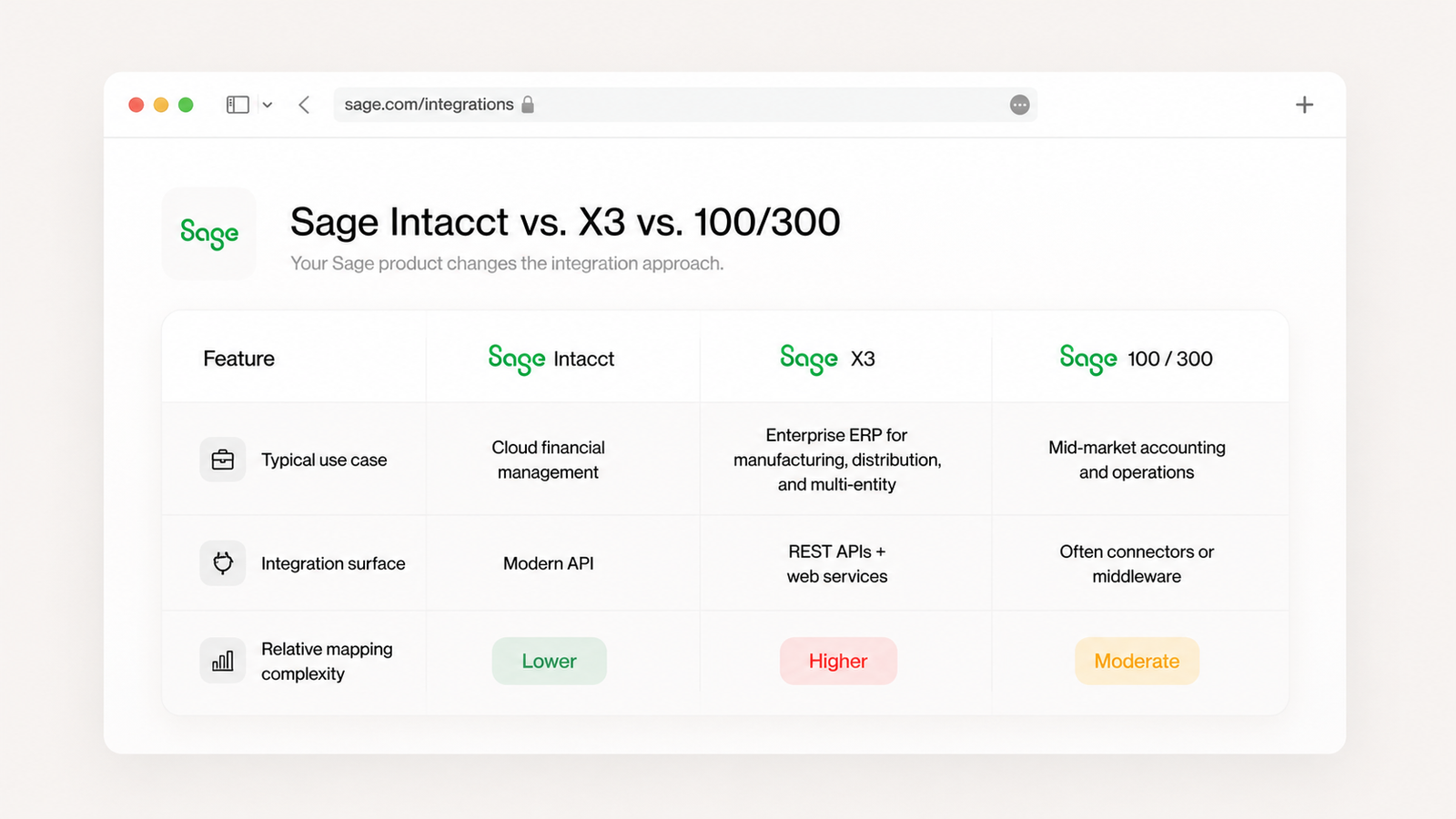
Sage Intacct is cloud-native financial management with a solid API, which generally makes for a cleaner, more direct integration. If you're on Intacct, you've got a modern surface to build against.

Sage X3 is a heavier enterprise ERP covering manufacturing, distribution, and multi-entity operations. It exposes web services and REST APIs, but the data model is richer and the mapping work is correspondingly deeper. Sage 100 and 300 sit in the mid-market and often lean on connectors or middleware to bridge cleanly to a modern commerce platform.

The takeaway: "Sage integration" isn't one project. Confirm the exact product and version first, because that decides your integration surface and a good chunk of your timeline.
What data should flow between Sage and Shopify Plus?

The list is predictable. The discipline is in the direction and the timing.

Orders and payments flow from Shopify into Sage so revenue and cash are recorded accurately. Inventory levels typically flow from Sage out to Shopify so the storefront reflects what's actually available. Product and pricing data flows depend on which system you treat as the master. Customer records and tax data flow in whichever direction keeps your books and your compliance clean.

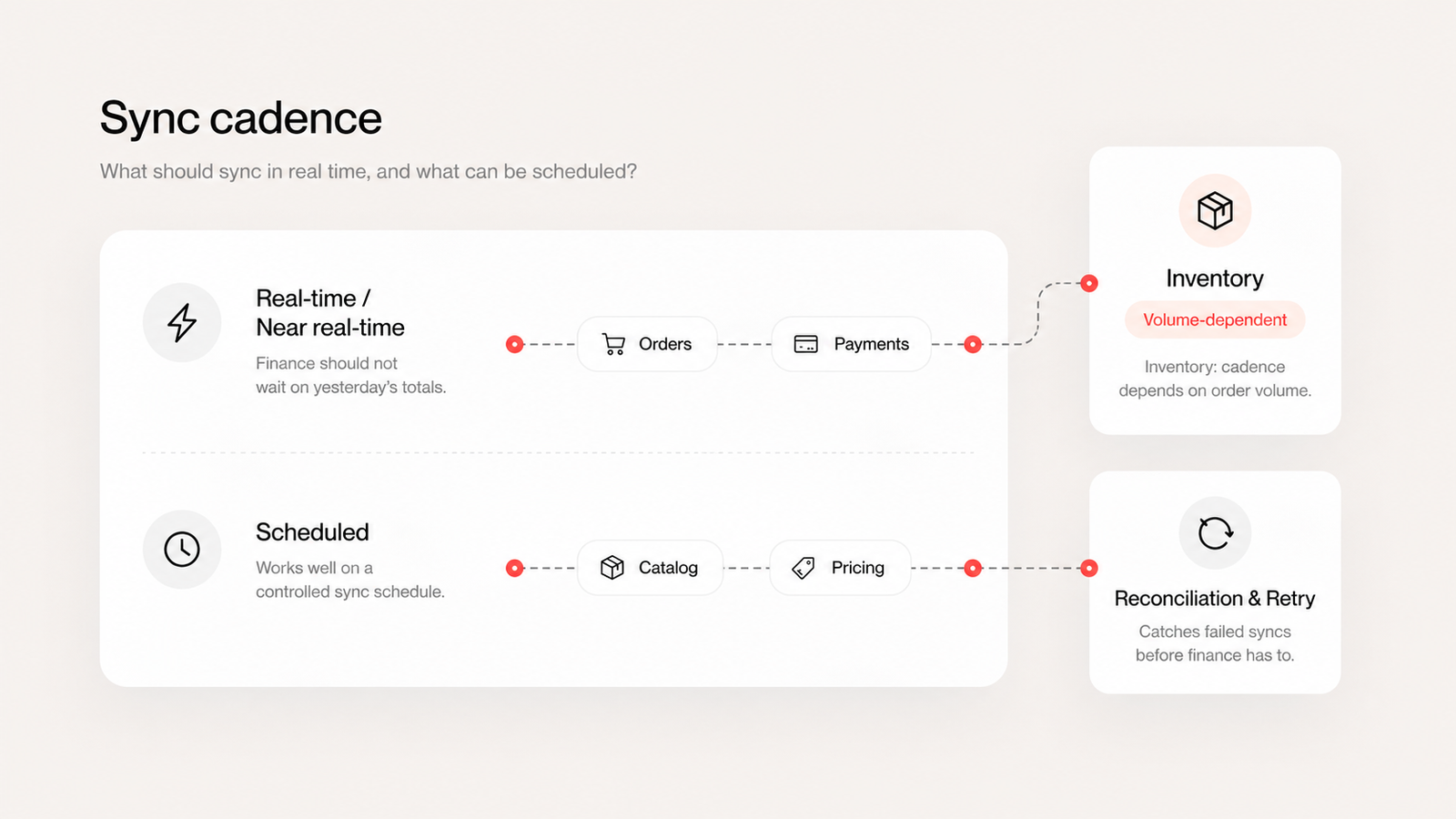
The detail that decides success is what's real-time versus scheduled. Order and payment data usually wants to land in Sage promptly so finance isn't waiting on yesterday's totals. Inventory sync cadence has to match your order volume, or you'll oversell. And every integration needs reconciliation logic for the inevitable failed sync at 2 a.m., so a dropped order doesn't quietly go missing from the books.

That reconciliation piece is the difference between an integration finance trusts and one they shadow with a spreadsheet.
Make your numbers agree

If Sage and Shopify aren't reconciling, or your finance team is still re-keying orders by hand, we can map exactly where the gap is and what a clean integration looks like for your Sage product. Contact Makro Agency to scope your Sage to Shopify Plus integration.

FAQ

Can Sage integrate with Shopify Plus? Yes. Sage products including Intacct, X3, 100, and 300 can connect to Shopify Plus through iPaaS connectors, custom API integrations, or a hybrid of both. The right approach depends on your Sage product and the complexity of your accounting.

What's the best way to connect Sage to Shopify? There's no single best way. A connector or iPaaS works well for standard data flows, a custom API integration suits complex or multi-entity accounting, and many enterprise brands use a hybrid. The deciding factor is your accounting complexity and order volume.

Does the integration differ between Sage Intacct and Sage X3? Yes. Sage Intacct is cloud-native with a modern API that allows a more direct integration. Sage X3 is a heavier ERP with a richer data model, so the mapping work is deeper. Confirming your exact Sage product and version is the first step in scoping any integration.

What data syncs between Sage and Shopify Plus? Typically orders and payments flow from Shopify into Sage, inventory flows from Sage out to Shopify, and product, pricing, customer, and tax data sync in whichever direction matches your source of truth. The key decisions are direction and sync timing.

Why do my Sage and Shopify numbers not match? Usually because of sync timing gaps or missing reconciliation logic, so a failed or delayed sync leaves an order or payment unrecorded. A well-built integration includes retry and reconciliation handling specifically to keep the two systems in agreement.

Get Makro News & Advice straight to your inbox.

Subscribe to our newsletter and be the first to hear about what’s hot in e-commerce.
*
Thank you! Your submission has been received!
Oops! Something went wrong while submitting the form.

Read next:

June 23, 2026

Sage to Shopify Plus Integration: Connecting Your Financials Without the Drift

Partnering with the right Shopify eCommerce Design Agency can build a storefront that delivers real business impact.

Sage to Shopify Plus Integration: Connecting Your Financials Without the Drift

Key takeaways

  • A Sage to Shopify Plus integration is as much a finance project as a commerce one. Sage is where your numbers have to be right, so accuracy is the whole point.
  • Which Sage product you run, Intacct, X3, 100, or 300, changes the integration approach. They don't all expose data the same way.
  • The data that has to flow is predictable: orders, payments, inventory, customers, and tax. The work is deciding what syncs in which direction, and when.
  • Done right, the finance team stops re-keying orders and stops running parallel spreadsheets, because Sage and Shopify finally agree.

If you're running Sage behind your Shopify Plus store, you care about one thing above all: the numbers reconcile. Sage is your financial source of truth, and the moment your storefront and your books disagree, your finance team feels it first and trusts the system least.

So a Sage integration isn't really a "connect two tools" project. It's a "make one set of numbers true everywhere" project. Here's what that takes.

How does Sage integrate with Shopify Plus?

There are three honest paths, and the right one depends on your volume and your Sage product.

A connector or iPaaS platform (think Celigo, Patchworks, or similar) gets you a configurable, maintained pipeline without building from scratch. It's the right call for a lot of brands, especially when your data flows are fairly standard.

A custom integration through Sage's and Shopify's APIs makes sense when your logic is specific enough that a templated connector would need so much customization you've effectively built custom anyway. This is the path when you have multi-entity accounting, unusual order-to-cash logic, or strict requirements about how revenue posts.

A hybrid uses an iPaaS for the standard flows and custom logic for the parts that need it. In practice this is where a lot of enterprise builds land.

None of these is automatically "best." The best one is the one that matches your accounting complexity, and naming that complexity early is what keeps the project honest.

Sage Intacct vs. Sage X3: does the integration change?

Yes, and it's worth knowing why before you scope anything.

Sage Intacct is cloud-native financial management with a solid API, which generally makes for a cleaner, more direct integration. If you're on Intacct, you've got a modern surface to build against.

Sage X3 is a heavier enterprise ERP covering manufacturing, distribution, and multi-entity operations. It exposes web services and REST APIs, but the data model is richer and the mapping work is correspondingly deeper. Sage 100 and 300 sit in the mid-market and often lean on connectors or middleware to bridge cleanly to a modern commerce platform.

The takeaway: "Sage integration" isn't one project. Confirm the exact product and version first, because that decides your integration surface and a good chunk of your timeline.

What data should flow between Sage and Shopify Plus?

The list is predictable. The discipline is in the direction and the timing.

Orders and payments flow from Shopify into Sage so revenue and cash are recorded accurately. Inventory levels typically flow from Sage out to Shopify so the storefront reflects what's actually available. Product and pricing data flows depend on which system you treat as the master. Customer records and tax data flow in whichever direction keeps your books and your compliance clean.

The detail that decides success is what's real-time versus scheduled. Order and payment data usually wants to land in Sage promptly so finance isn't waiting on yesterday's totals. Inventory sync cadence has to match your order volume, or you'll oversell. And every integration needs reconciliation logic for the inevitable failed sync at 2 a.m., so a dropped order doesn't quietly go missing from the books.

That reconciliation piece is the difference between an integration finance trusts and one they shadow with a spreadsheet.

Make your numbers agree

If Sage and Shopify aren't reconciling, or your finance team is still re-keying orders by hand, we can map exactly where the gap is and what a clean integration looks like for your Sage product. Contact Makro Agency to scope your Sage to Shopify Plus integration.

FAQ

Can Sage integrate with Shopify Plus? Yes. Sage products including Intacct, X3, 100, and 300 can connect to Shopify Plus through iPaaS connectors, custom API integrations, or a hybrid of both. The right approach depends on your Sage product and the complexity of your accounting.

What's the best way to connect Sage to Shopify? There's no single best way. A connector or iPaaS works well for standard data flows, a custom API integration suits complex or multi-entity accounting, and many enterprise brands use a hybrid. The deciding factor is your accounting complexity and order volume.

Does the integration differ between Sage Intacct and Sage X3? Yes. Sage Intacct is cloud-native with a modern API that allows a more direct integration. Sage X3 is a heavier ERP with a richer data model, so the mapping work is deeper. Confirming your exact Sage product and version is the first step in scoping any integration.

What data syncs between Sage and Shopify Plus? Typically orders and payments flow from Shopify into Sage, inventory flows from Sage out to Shopify, and product, pricing, customer, and tax data sync in whichever direction matches your source of truth. The key decisions are direction and sync timing.

Why do my Sage and Shopify numbers not match? Usually because of sync timing gaps or missing reconciliation logic, so a failed or delayed sync leaves an order or payment unrecorded. A well-built integration includes retry and reconciliation handling specifically to keep the two systems in agreement.

Read next:

Previous post here

There are no next posts
Read next:

Next Post here

There are no next posts
Go back to blog