
How Do You Build a Self-Service B2B Portal on Shopify Without Replacing Your ERP?
How do you give B2B buyers a better ecommerce experience without creating duplicate systems behind the scenes?
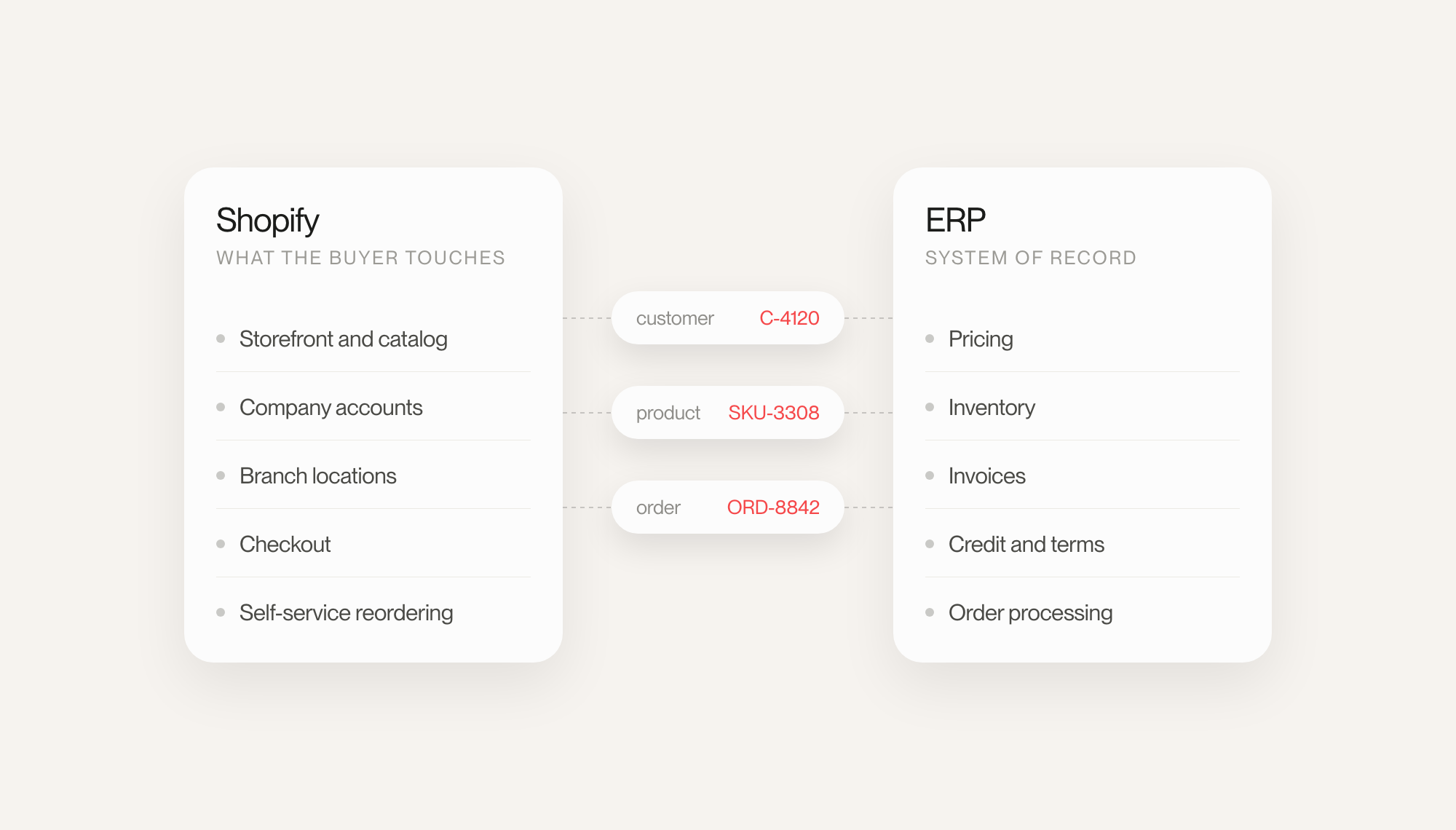
For B2B brands with more complex operations, the answer is usually not to rebuild everything inside Shopify. Instead, Shopify can become the customer-facing commerce layer while the ERP continues to manage the operational data and workflows it already owns, including pricing, inventory, customer accounts, orders, and invoices.
Start by Deciding What Shopify Should Own
The biggest mistake is treating Shopify and the ERP like they both need to manage the same information.
They usually do not.
Shopify can handle the parts of the experience buyers interact with directly: storefronts, company accounts, catalogs, checkout, and self-service ordering. The ERP can continue managing the operational processes already embedded in the business.
Once those roles are clear, the architecture becomes much easier to design.
The goal is not to recreate the ERP inside Shopify. It is to decide what Shopify needs to know in order to give the customer a smooth buying experience.
Connect the Systems Instead of Duplicating Them
This is where custom Shopify development becomes valuable.
A custom app or integration layer can connect Shopify with the ERP and map the records both systems need to recognize, including customers, company locations, products, orders, pricing references, and external IDs.
That creates a controlled flow of information between systems without forcing teams to maintain the same business rules in two places.
For example, Shopify might display the products available to a particular buyer while the ERP remains responsible for the inventory or account data behind them. When an order is submitted, Shopify can capture the purchase while the integration passes the right information into the ERP for processing.
The buyer sees one experience. The business keeps the systems it already depends on.
What Does This Look Like in a Real B2B Store?
Our work with Acme Smoked Fish is a good example of this approach.
Their B2B operation had more complexity than a standard online store. Customers needed to order online, access products relevant to their account, move between branches, and see order and invoice information.
Makro built a Shopify B2B portal connected to Infor M3 so those workflows could come together in one customer-facing experience.
The backend complexity did not disappear.
The customer simply did not have to deal with it anymore.
That is an important distinction. A strong B2B ecommerce build does not necessarily simplify the business itself. It simplifies how buyers interact with that business.
Build the Integration for Real-World Conditions
Getting Shopify and an ERP connected is only the first step.
The harder part is making sure the integration stays reliable when something does not happen exactly as expected.
ERP responses can be delayed. Updates can fail. Product mappings can be missing. Events can arrive twice. One system may temporarily be unavailable.
A production-ready integration needs to account for those conditions.
Depending on the merchant, that can mean scheduled synchronization, event-driven updates, caching, retry logic, reconciliation processes, and safeguards that prevent the same order from being created twice.
It is also worth deciding which information actually needs to move in real time.
Inventory or account permissions may need frequent updates. Other data may be perfectly fine syncing on a schedule. Avoiding unnecessary live requests can make the storefront faster and prevent an ERP slowdown from becoming a customer-facing problem.
A Few Things to Get Right Before You Build
Before developing a Shopify B2B portal around an ERP, merchants should:
- define the source of truth for every important data type
- use Shopify's native B2B company, location, and catalog functionality where it fits
- maintain stable external IDs between Shopify and the ERP
- decide which data needs real-time synchronization and which does not
- plan what happens when an update or API request fails
- make sure developers can trace orders and updates across both systems
- design the buyer experience around the business workflow, not the limitations of the backend
These decisions are often more important than the integration code itself.
The Best B2B Architecture Makes Complexity Invisible
Shopify does not have to replace the ERP to improve the customer experience.
For many merchants, the better approach is to let each system do what it does best: the ERP continues running the operational side of the business, Shopify gives customers a modern commerce experience, and custom development connects the two.
That is the model behind Makro’s Shopify B2B work with Acme Smoked Fish, where the goal was not to remove operational complexity, but to stop making the customer navigate it.
When that architecture is designed well, buyers do not need to know where pricing comes from, which system stores their account, or how an order moves through the backend.
They just know they can log in, find what they need, place an order, and get on with their day.
That is what a good self-service B2B portal should accomplish.