
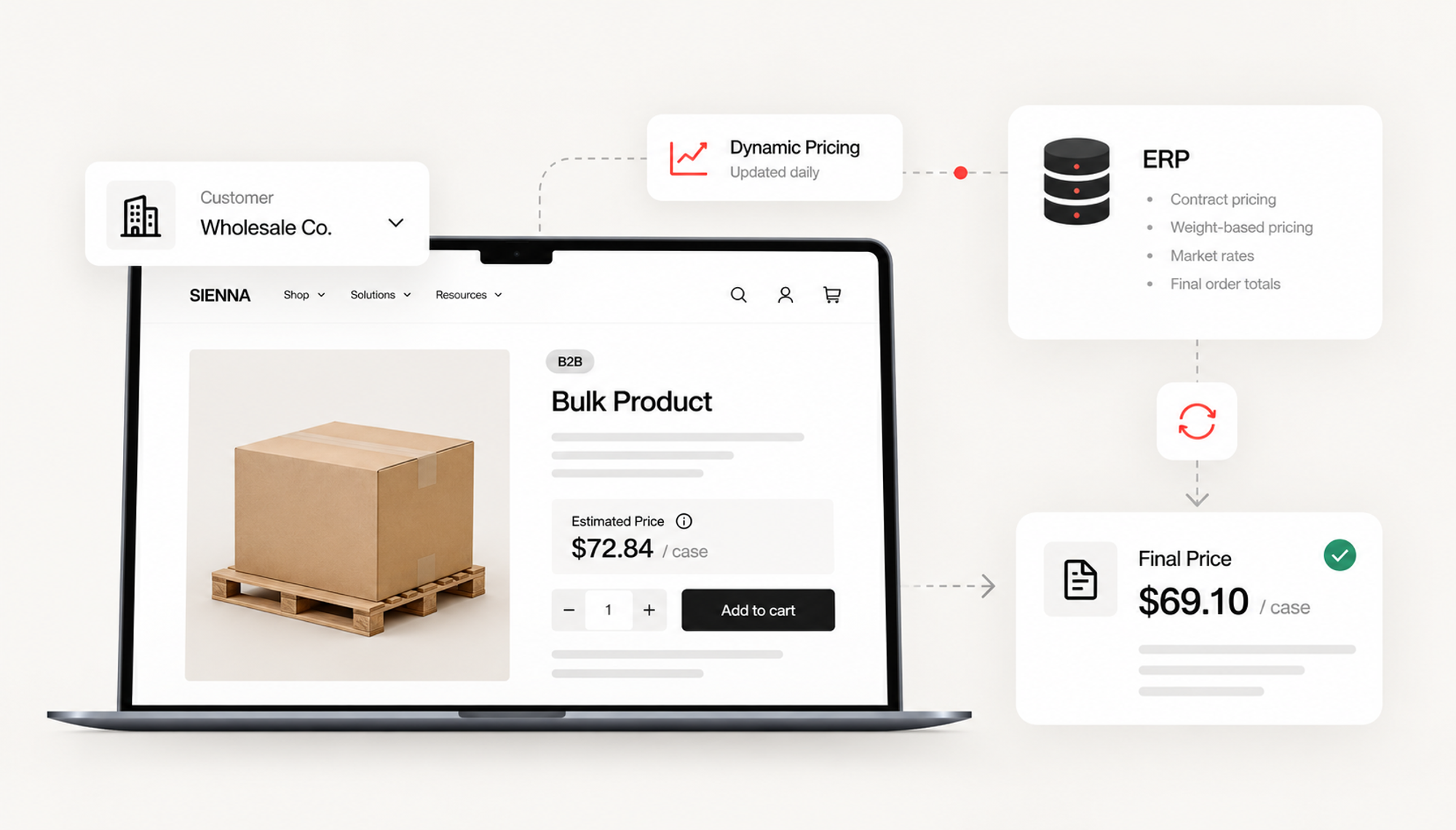
How Do You Handle Dynamic B2B Pricing on Shopify?
For many Shopify merchants, pricing is simple.
A product costs $40. The customer sees $40. They add it to cart and pay $40.
B2B commerce is rarely that clean.
A distributor might have negotiated rates for individual accounts. A food supplier may sell products where the final price depends on actual weight. A commodity-based business might update prices daily. Another merchant may have hundreds of customers with pricing agreements already managed inside an ERP.
At that point, the question is no longer:
Can Shopify display a different price?
The more important question is:
Which system should determine the price, when should that price become final, and how should Shopify communicate it to the buyer?
That is an architecture problem.
And solving it well often requires a combination of Shopify's native B2B capabilities, ERP integration, and custom app development.
Why Does B2B Pricing Become Complicated So Quickly?
There are several different problems that are often grouped together under the term "custom pricing."
They are not the same problem.
A merchant might need:
- negotiated pricing for specific customers
- different pricing by company or branch
- volume-based price breaks
- products restricted to certain accounts
- market-based pricing
- prices calculated from weight or quantity
- contract pricing stored in an ERP
- temporary promotional pricing
- prices that aren't known until an order is processed
The technical solution should depend on the pricing rule.
For example, Shopify's B2B catalogs can control which products and prices B2B customers have access to. Shopify also supports quantity rules and volume pricing. On Shopify Plus, catalogs can be assigned directly to specific companies or company locations for more granular customer-level pricing.
That makes native catalogs a strong fit for pricing that can be determined before the customer begins ordering.
But not every price works that way.
Consider fresh food.
A buyer may order a case containing a product priced by weight. The exact weight isn't known until the product is selected or packed.
Or consider a distributor selling a commodity whose market value changes throughout the day.
There may be a perfectly valid price when the customer submits the order, but it is not necessarily the final invoice price.
Trying to force those models into standard ecommerce pricing can create more problems than it solves.
The Better Architecture Starts With Price Ownership
Before developing anything, identify the system that owns the price.
This sounds simple. It isn't.
In many established businesses, Shopify is not the source of truth for:
- customer contracts
- account-specific pricing
- inventory
- credit terms
- fulfillment
- invoicing
- product cost
- final order totals
An ERP may already own those rules.
If so, recreating the entire pricing model inside Shopify can result in two systems independently trying to calculate the same thing.
That creates a synchronization problem.
Imagine an ERP says Customer A should pay $72.84 for an item while Shopify says $73.10.
Which one wins?
Now multiply that discrepancy across thousands of SKUs, hundreds of customers, multiple warehouses and changing price lists.
A sophisticated Shopify implementation should avoid unnecessary duplication of business logic.
Instead, define clear ownership.
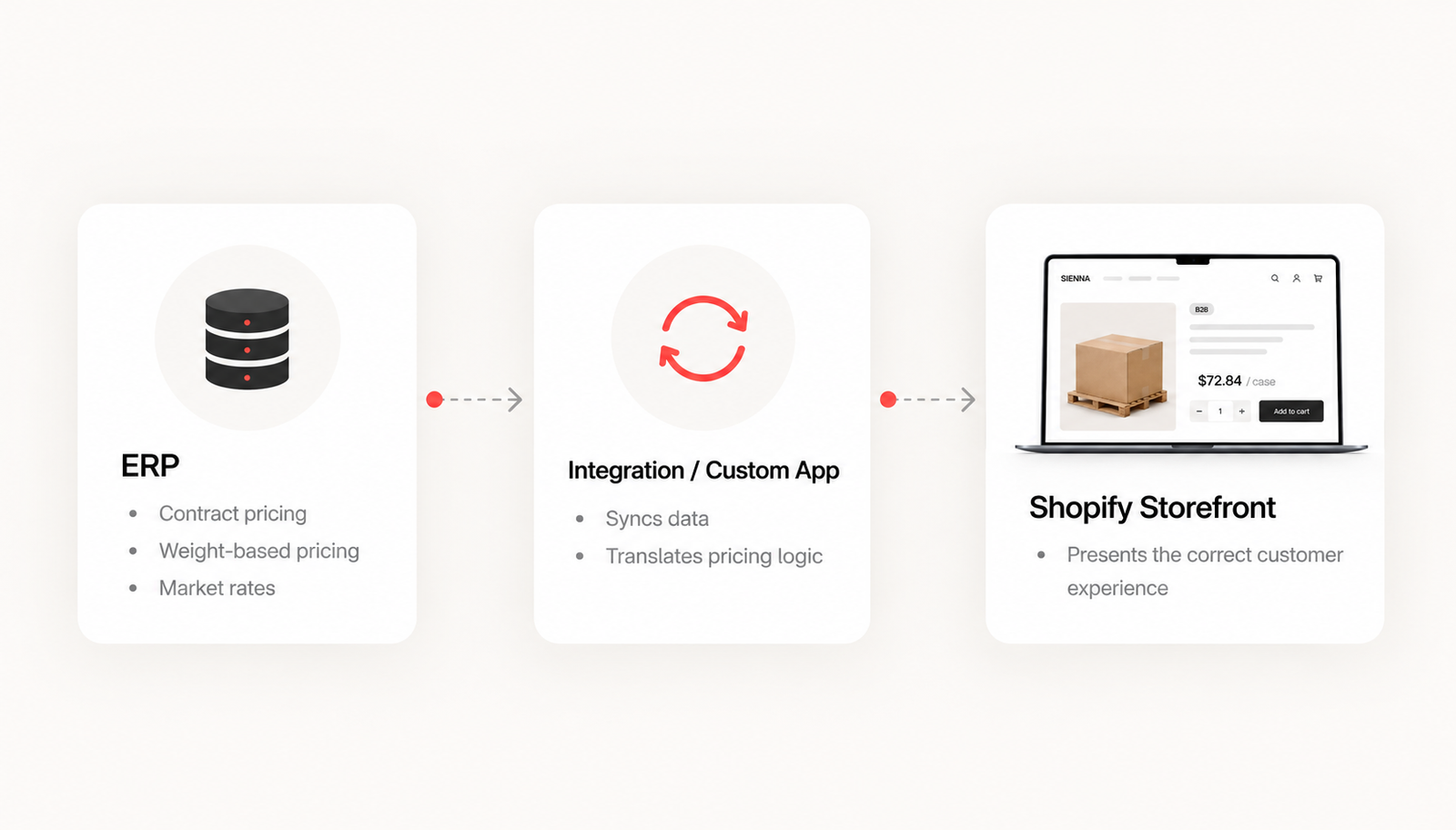
A common architecture might look something like this:
ERP
→ owns contractual or operational pricing rules
Integration layer or custom Shopify app
→ retrieves, translates and synchronizes relevant pricing data
Shopify
→ presents the correct buying experience to the authenticated customer
That division is much easier to maintain.
What If the Final Price Isn't Known at Checkout?
This was one of the challenges behind Acme Smoked Fish's B2B commerce experience.
Our client, ACME Smoked Fish, serves a wholesale network where certain products cannot use conventional fixed pricing. Final pricing may depend on factors such as weight, market conditions or daily rates. Makro developed a Shopify B2B flow where buyers can order using estimated pricing and later see the final pricing after the order has been processed through Acme's Infor M3 ERP.
That distinction matters.
The solution wasn't simply to create thousands of unusual Shopify prices.
It was to design the commerce flow around the actual business process.
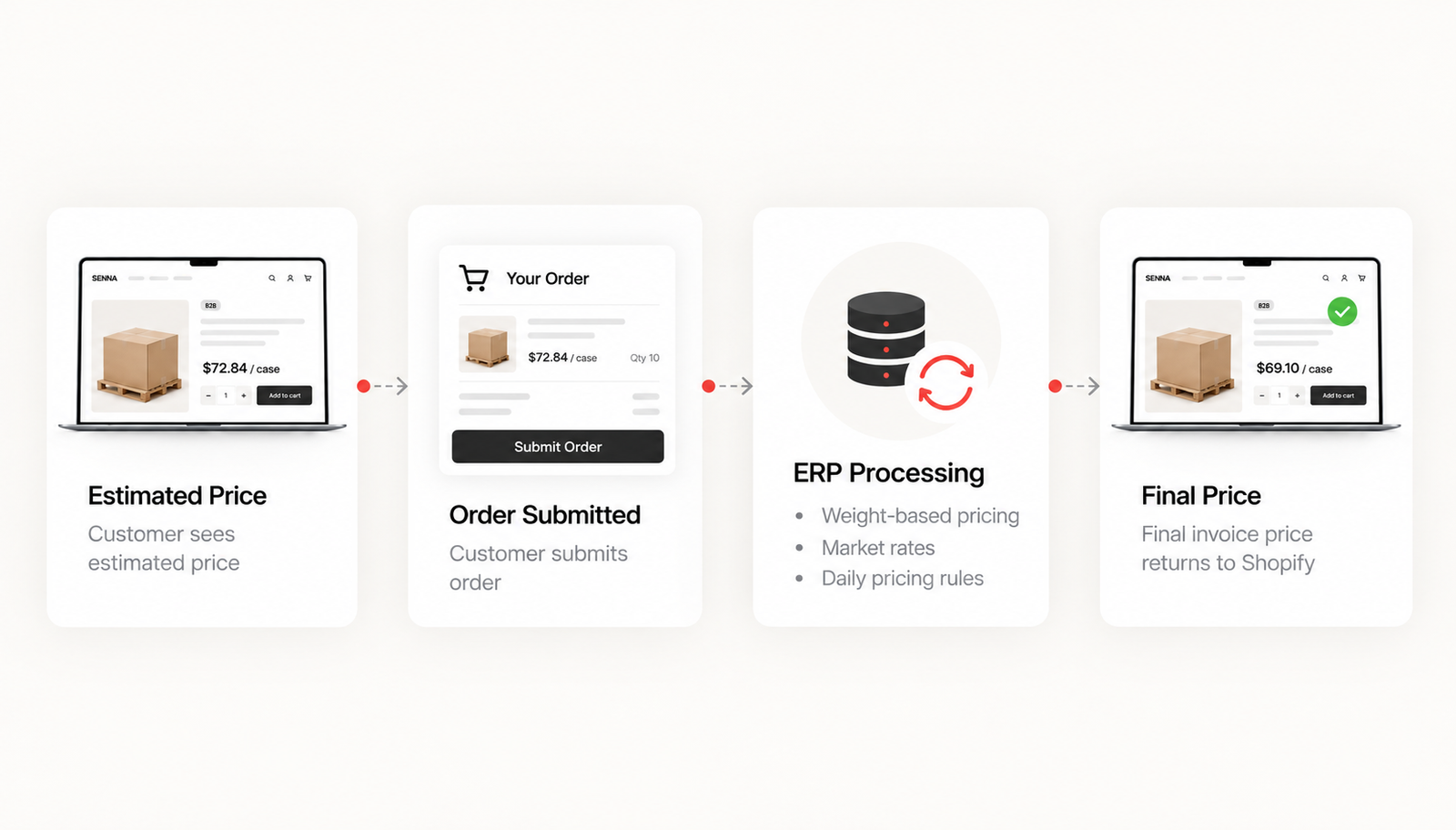
Estimated price
The storefront gives the buyer enough information to make a purchasing decision and submit the order.
Order submission
Shopify captures the buyer's intent, products, quantities, account and other required order information.
ERP processing
The operational system processes the order using the rules and data required to determine the final amount.
Final price
Updated order or invoice information can then be surfaced back to the customer.
That is a very different ecommerce architecture from a standard DTC transaction.
And it demonstrates an important principle:
The storefront does not always need to calculate every business rule itself.
It needs to orchestrate the buying experience correctly.
Where Custom Shopify Apps Fit In
There is a tendency to think of Shopify apps as features merchants install from the App Store.
Custom apps can play a much deeper architectural role.
For complex B2B environments, an app can act as the translation layer between Shopify and the systems operating behind it.
For example, a custom application could be responsible for retrieving an external account identifier, mapping a Shopify company location to an ERP customer record, synchronizing eligible products, exposing appropriate account data, triggering an ERP request when an order is created, and recording processing status.
Shopify's GraphQL Admin API exposes B2B resources for companies, company locations, catalogs and related functionality specifically so apps can build workflows around these objects.
The hard part isn't necessarily making the API request.
The hard part is deciding what should happen when that request fails.
Experienced integration development needs to think about questions such as:
What happens if the ERP is unavailable?
What if a SKU exists in Shopify but not in the ERP?
What if the customer's pricing agreement has expired?
What if the ERP processes an order twice?
What if the price changes between order submission and processing?
What if the integration receives an update for an order that Shopify has already cancelled?
Those edge cases are where an integration moves from "it works in a demo" to something a business can actually operate.
Don't Make Real-Time Requests Unless They Need to Be Real Time
Another architectural decision is synchronization frequency.
It can be tempting to request pricing from the ERP every time someone loads a product page.
Sometimes that is appropriate.
Often it isn't.
A synchronous dependency means storefront performance and availability can become dependent on an external system.
If the ERP takes four seconds to return a response, the shopper shouldn't necessarily have to wait four seconds for a product page.
The better pattern depends on how quickly the underlying data changes.
Relatively stable customer pricing might be synchronized ahead of time.
Frequently changing data might need scheduled updates.
Highly dynamic information might warrant a real-time request.
Final transactional pricing may belong in the order-processing workflow rather than on the product page at all.
Architecture should follow the business rule, not the other way around.
Customer Context Matters Just as Much as Product Context
B2B pricing is rarely determined by SKU alone.
It can depend on who is buying.
Shopify models B2B customers through companies and company locations. A company can contain multiple locations, with individual locations carrying their own pricing, payment terms, addresses, tax settings and other buying context.
That is important for merchants selling to organizations with multiple branches.
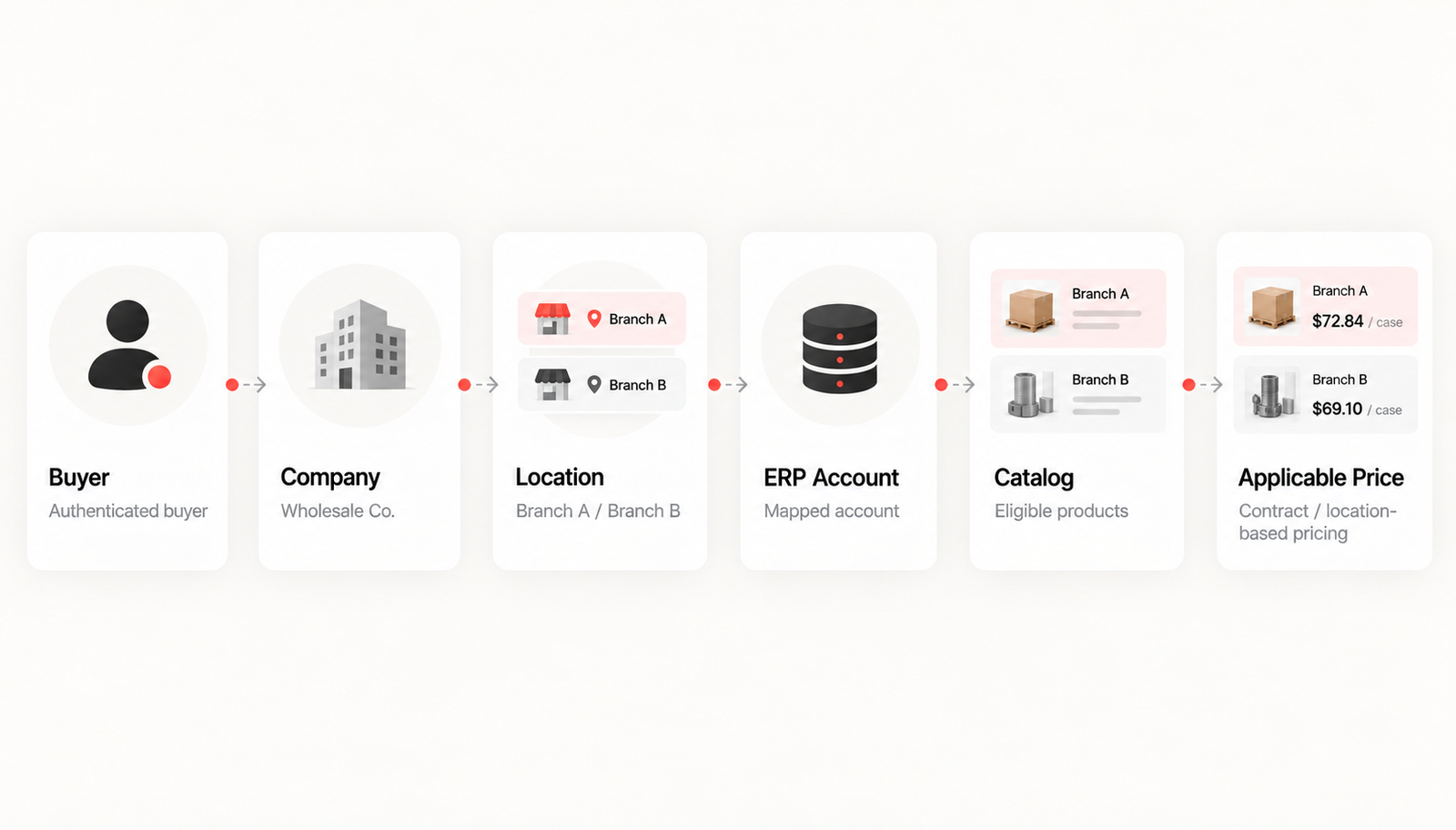
Consider a restaurant group with twenty locations.
The purchasing manager may need access to several branches.
One branch could have a different product assortment.
Another could operate under different payment terms.
A third may have a negotiated product price.
The app or integration therefore needs to understand more than:
Customer = jane@example.com
It may need to resolve:
Jane → Company → Selected Location → ERP Account → Eligible Catalog → Applicable Pricing
That customer-context resolution is often one of the most important parts of a custom B2B Shopify build.
The UX Still Has to Make Sense
Technically correct pricing can still create a poor ecommerce experience.
If a value is estimated, label it clearly.
If the final amount can change, explain why.
If an account contract controls the customer's price, don't make them wonder whether a public promotion applies.
If pricing isn't available, don't silently display $0.
Custom development should reduce the amount of business complexity the buyer has to interpret.
The backend can be complicated.
The buying experience shouldn't feel complicated.
8 Tips for Building Dynamic Pricing Into Shopify
- Identify the source of truth before writing code. Decide whether Shopify, an ERP, a PIM, another pricing engine or some combination owns each pricing rule.
- Separate static pricing from transactional pricing. A contract price known in advance is a different technical problem from a final price calculated after weighing or processing a product.
- Use native Shopify functionality where it fits. Don't rebuild catalogs, company structures or volume rules in a custom application simply because you can.
- Create stable external identifiers. Shopify records and ERP records need reliable IDs for companies, locations, products and orders. Names and email addresses are poor integration keys.
- Design for retries and duplicate events. Integrations should be idempotent where possible so retrying an operation doesn't accidentally create another order or transaction.
- Log business events, not only technical errors. "API request failed" isn't enough. Your team should be able to determine which customer, order, SKU and integration step failed.
- Build a fallback experience. An ERP outage shouldn't automatically turn into a broken storefront.
- Make pricing states visible to the customer. Estimated, pending and finalized pricing should be distinguishable when the business process requires them.
Complex Pricing Doesn't Mean Shopify Is the Wrong Platform
The presence of complicated pricing is sometimes interpreted as evidence that a business has "outgrown ecommerce."
Usually, that is the wrong conclusion.
The better question is which parts of the pricing model belong inside Shopify and which should remain with the systems already responsible for running the business.
For ACME Smoked Fish, that meant creating a Shopify B2B buying experience around an existing wholesale model rather than forcing the wholesale model to behave like traditional retail ecommerce. The portal connects Shopify with Infor M3 while supporting changing pricing alongside customer accounts, branches, products, invoices and order information.
That is what custom Shopify development should do.
Not add complexity for the sake of customization.
Take the complexity the business already has and turn it into a buying experience customers can actually use.